Petpet GIF Maker
Pat any picture or avatar with the classic petting hand. Live preview, transparent background, made on your device.
How to make a petpet GIF
- Drop a picture on the frame above, press Choose file, or paste one with Ctrl+V (Cmd+V on a Mac). Avatars, pet photos and drawings all work. Square-ish pictures work best.
- Drag the picture inside the preview until the face sits under the hand. Zoom in if there’s a lot of background around it.
- Adjust squish and speed until the pat feels right. The preview isn’t an approximation: those same 10 frames go into the file.
- Press Download GIF. The line under the button says how big the file is and whether it fits a Discord emoji.
Settings explained
Every petpet is 10 frames. Over the first half the hand presses down and the picture flattens and widens; over the second half it springs back. The settings change how far, how fast and on what.
Squish
How hard the hand presses. At 1 you get the classic pat, with the picture losing about a third of its height at the bottom of the press. At 2 it flattens to well under half. At 0 nothing moves at all, which is a fun way to check your framing.
Speed
How long each frame stays on screen, from 0.02 to 0.10 seconds. The default 0.05 s gives one full pat every half second. We stop at 0.02 s on purpose: browsers show a GIF frame set to 0.01 s or 0 at 0.10 s, so a “faster” setting would make your GIF crawl.
Size
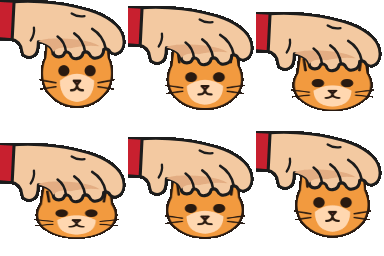
The GIF is square: 64, 112, 128 or 256 px. Size drives file size more than anything else. On a busy 512 × 512 concert photo we measured 25 KB at 64 px, 60 KB at 112, 74 KB at 128 and 220 KB at 256. Drawings with flat colors come out much smaller: the cartoon cat below is 36 KB at 128 px.
Background and edge matte
Transparent keeps everything outside your picture and the hand see-through, so the GIF sits cleanly on any chat background. There’s a catch. GIF has no partial transparency, so the soft pixels along every edge get blended with one solid color, the matte. Pick the color of the place the GIF will live: Dark for Discord’s dark theme, White for light themes and most websites. Get it wrong and you see a thin halo.
Solid color fills the whole square instead, and the swatches pick that color. Use it when the GIF will be posted somewhere that doesn’t show transparency well.
Using it as a Discord emoji
Discord takes custom emoji under 256 KB, and a GIF counts as an animated emoji, which is a Nitro and Nitro Basic feature. The size line under the Download button checks against a slightly lower 255,000 bytes, so a GIF that says it fits will upload however Discord counts a kilobyte.
A petpet rarely gets near the limit. Even our busiest test photo stayed under it at 256 px, with about 35 KB to spare. If yours goes over, it’s almost certainly a detailed photo at 256 px: drop to 128 px and it’ll fit with room left.
Examples
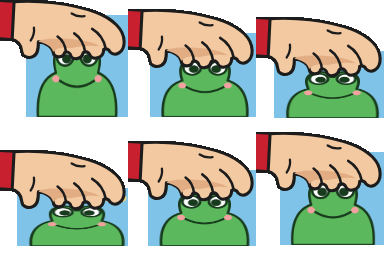
Three petpets made with this page from our own drawings. The hand is our own drawing too, not a copy of the sprite from the original petpet generators.

FAQ
What is a petpet GIF?
A short loop of a cartoon hand patting someone on the head. The picture squashes down with each pat and springs back up. People make them of friends’ avatars, pets and characters, mostly to drop in a Discord chat as a reaction: “good job”, “there there”, or just affection.
How do I make a petting GIF of my Discord avatar?
Get your avatar as an image first: save it from your profile, or take a screenshot of it. A rough screenshot is fine, because you can zoom and drag to crop it here. Drop it on the frame above, drag the face under the hand, and press Download GIF.
Why does the edge look white on Discord?
A GIF pixel is either fully transparent or fully solid. The soft, half-transparent pixels around your picture and the hand get blended with a color to become solid, and if that color was white, you see a pale fringe on Discord’s dark theme. Pick the Dark matte (the default here) for dark mode, White for light mode.
What size should a petpet emoji be?
128 × 128 px is the usual size for an emoji, and it’s the default here. Pick 64 px if you want the lightest file. Save 256 px for a GIF you’ll post as an image in chat rather than use as an emoji.